
Resident Evil Outbreak beginner guide
Your first goal is to understand what the scenario needs from you, then move toward that goal with enough supplies to keep going. You do not need to learn every character, optional event, or item combination before your first attempt.
SOURCES CHECKED OCTOBER 25, 2026 · ORIGINAL-GAME REFERENCEThis guide starts after you enter a scenario. If you still need to launch the game, use Getting Started.
1. Know your next objective
Scenarios ask you to solve problems and reach an ending. Exploration, puzzles, and combat contribute to that progress.
For a first attempt, give yourself one immediate question: which door, item, or interaction lets me continue? When you find a clue, connect it to that question. If you become lost, note your room name and the last objective you completed before looking at a walkthrough.
Check the scenario directory to identify the scenario you are playing. For the opening File #1 scenario, follow the Outbreak walkthrough.
2. Give each inventory slot a purpose
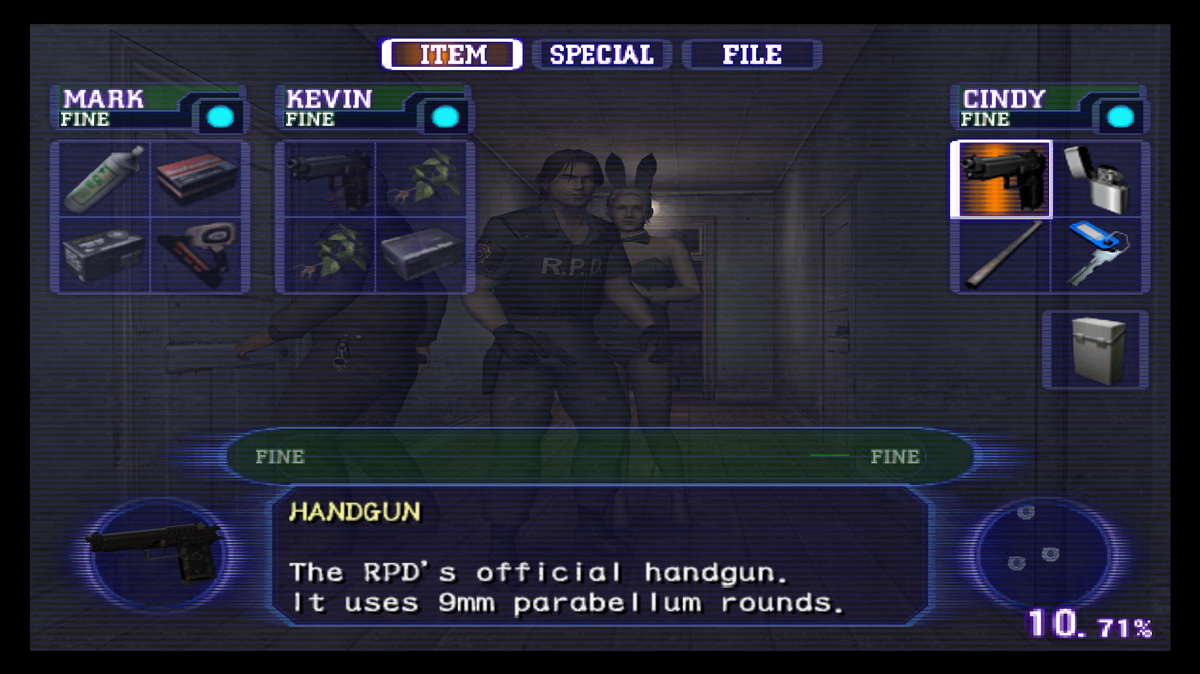
Most survivors have four regular item spaces; Yoko's Knapsack adds four.
Before picking something up, ask what you would replace. A useful starting plan is to keep a usable weapon, supplies for it, recovery when available, and room for the next required item. Adjust that plan to your character and the route; it is a decision aid, not a mandatory loadout.
Make sure the weapon you intend to use is equipped. Practice the relevant actions in the controls guide before trying to manage equipment during a fight.
4. Watch health and infection separately
Health condition and the Virus Gauge are separate indicators. Infection grows with time and attacks; incapacitation makes it rise faster.
Check both after a difficult encounter. A useful question is whether your next decision helps you reach the objective: continuing forward, using recovery, helping someone, or taking a short detour for a needed supply. Try to avoid repeatedly crossing the same rooms without a clear purpose.
Plan recovery before the situation becomes desperate. If you need a teammate's help, communicate while there is still time to organize it.
6. Make the next attempt easier
After a run, choose one thing to improve: an unnecessary detour, an inventory decision, or a missed interaction. Repeat the section with that goal. Use the character comparison if you want a different responsibility on the next attempt.
For an early weapon in File #1’s opening scenario, use the shotgun location guide and check its difficulty table before taking the detour.
Before ending a session, read the save guide for the distinction between game progress and browser persistence. For joining other players, continue to the online guide.
Dying does not make Collection outfits impossible to unlock. Read how to keep SP item progress after Game Over and complete the required game-data save.
Frequently asked questions
Should I pick up everything?
Our recommendation is to carry items with a current purpose and leave room for the next objective. If you cannot explain when you will use an item, reconsider it before replacing something essential.
Do I need to complete every optional activity on my first run?
Make reaching the ending your first learning goal. Once you understand the route, choose a specific optional objective for the next attempt instead of trying to learn everything at once.
A walkthrough does not match my game. What should I check?
Check the game, scenario, difficulty, chosen survivor, and whether the route expects human or AI teammates. Read any stated version conditions before copying an exact item location or puzzle solution.
Sources and verification limits
The basics draw on the original games; they do not claim browser testing of every action or mode. Original-game mechanics were checked on October 25, 2026. Our source notes explain how we label that scope.
Image notes and credits
Inventory screen
The original-game status screen shows carried items, nearby partners’ supplies and the Virus Gauge. This is a reference image from the original game. Source: SairentoZ7’s original-game guide. Game image © CAPCOM.